Customize your packageName - or any other metric or dimension - on Google Data Studio
How to rename your packageName (or any other dimension) on Data Studio dynamically using formulas
If your package name isn't looking as good as it could be, you can use a "find/replace" kind of function and make more readable.
You can do this by creating a calculated field with the following formula:
CASE WHEN packageName IN ("com.e546asdr7891.app") THEN "Beautiful App Name" ELSE packageName END
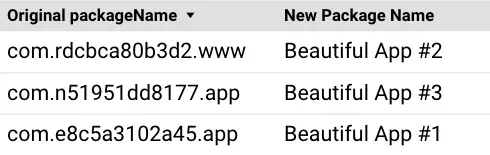
If you own multiple apps, you can add a different line for each packageName:
CASE WHEN packageName IN ("com.e546asdr7891.app") THEN "Beautiful App #1" WHEN packageName IN ("com.rdsf89823458.www") THEN "Beautiful App #3" WHEN packageName IN ("com.cbdsf3efc787.app") THEN "Beautiful App #1" ELSE packageName END
Result:
💡 You can also apply this to any other field you want by replacing the "packageName" with the field you'd like to rename
